Vagrus - The Riven Realms: Prologue System Requirements | Can My PC Run It?
PC requirements availability
The minimum PC specifications are incomplete in our catalogue. Available information is shown below; missing values have not been estimated.
Recorded platforms: PC, macOS, Linux
For Vagrus - The Riven Realms: Prologue, the following minimum requirement fields still need confirmation: system RAM with a confirmed unit, available storage. Check the exact edition and operating system before buying or upgrading hardware.
The imported RAM amount is inconsistent or has no confirmed unit. It is excluded from compatibility conclusions; no replacement amount is assumed.
Report an official requirements source for this edition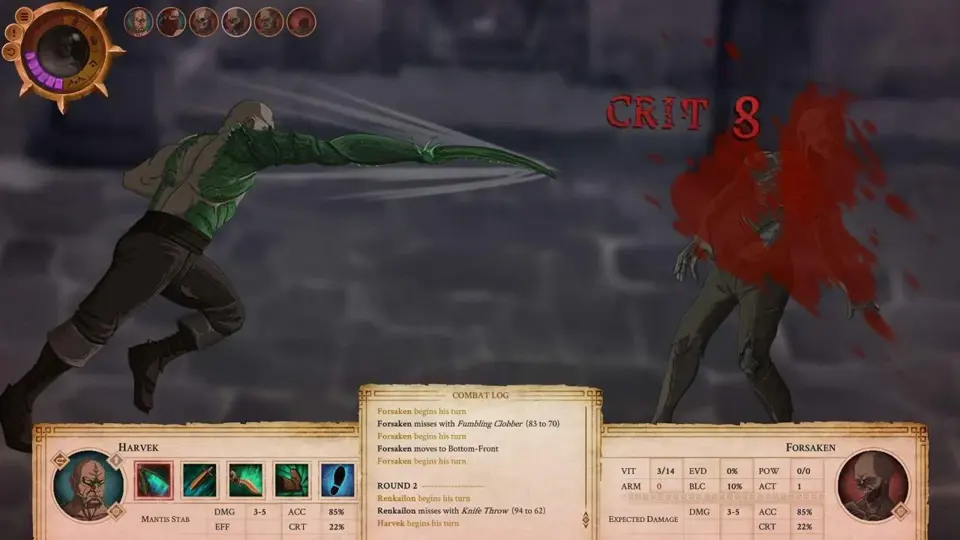
About Vagrus - The Riven Realms: Prologue
Vagrus - The Riven Realms: Prologue is an early Demo to Vagrus - The Riven Realms, a roleplaying game with a narrative focus, open-world exploration, and strong elements of strategy. The player takes the role of a vagrus - a caravan leader who strives to survive in a strange and dangerous dark fantasy world by leading a traveling company on all kinds of ventures.
Vagrus is currently in development (in late Alpha) but it already has over fifty hours of playable content. The game is coming to Steam in the form of Early Access in the near future.
This Demo showcases the beginning sections of the game - both from the more narrative-driven introductory part and from the open-world main campaign.
A vast realm is yours to explore, filled with unique locations, strange factions, and a colorful cast of characters. In order to punish the Empire for its sins, the Elder Gods unleashed their power a thousand years ago that ended up devastating the realms. The continent is now a wasteland, riddled with arcane anomalies, swarming with twisted monsters, and haunted by roaming undead even after long centuries of rebuilding.
A large selection of stories make up the game’s narrative in the form of events and quests. The choices you make in these often affect your companions and the world around you. Pick your background from trader, mercenary, or explorer; work for factions, follow rumors and trading opportunities; acquire wealth, gain fame, and discover hidden knowledge.
Engage in turn-based, tactical combat that involves your companions and a large variety of enemies, both humanoid and monstrous. Use a wide range of character skills as well as your own leadership-related abilities to succeed. Positioning and support skills are of paramount importance in these challenging engagements.
Journeys have to be planned and prepared for carefully, lest they end in disaster. Manage your supplies, morale, and your crew’s vigor effectively to survive. Haul cargo and valuables across the wasteland or take it from others. Your crew of workers, fighters, scouts, and slaves have to be managed well to optimize their effectiveness.
Recruit from a wide variety of companions to have them serve in versatile caravan roles, such as scoutmaster, guard captain, treasure hunter, or beast handler. Each companion comes with unique combat skills, background stories, and personal quest lines that can upgrade them further when you complete them.
Follow and Wishlist Vagrus now.
Vagrus is currently in development (in late Alpha) but it already has over fifty hours of playable content. The game is coming to Steam in the form of Early Access in the near future.
This Demo showcases the beginning sections of the game - both from the more narrative-driven introductory part and from the open-world main campaign.
A vast realm is yours to explore, filled with unique locations, strange factions, and a colorful cast of characters. In order to punish the Empire for its sins, the Elder Gods unleashed their power a thousand years ago that ended up devastating the realms. The continent is now a wasteland, riddled with arcane anomalies, swarming with twisted monsters, and haunted by roaming undead even after long centuries of rebuilding.
A large selection of stories make up the game’s narrative in the form of events and quests. The choices you make in these often affect your companions and the world around you. Pick your background from trader, mercenary, or explorer; work for factions, follow rumors and trading opportunities; acquire wealth, gain fame, and discover hidden knowledge.
Engage in turn-based, tactical combat that involves your companions and a large variety of enemies, both humanoid and monstrous. Use a wide range of character skills as well as your own leadership-related abilities to succeed. Positioning and support skills are of paramount importance in these challenging engagements.
Journeys have to be planned and prepared for carefully, lest they end in disaster. Manage your supplies, morale, and your crew’s vigor effectively to survive. Haul cargo and valuables across the wasteland or take it from others. Your crew of workers, fighters, scouts, and slaves have to be managed well to optimize their effectiveness.
Recruit from a wide variety of companions to have them serve in versatile caravan roles, such as scoutmaster, guard captain, treasure hunter, or beast handler. Each companion comes with unique combat skills, background stories, and personal quest lines that can upgrade them further when you complete them.
Follow and Wishlist Vagrus now.
Screenshots

Additional requirement details
Minimum sound card
DirectX 9.0c compatible
Score Not confirmed
Released May 26, 2020
Developer
Publisher
Platforms
PCmacOSLinux
Vagrus - The Riven Realms: Prologue System Requirements
Minimum
- OS:
- Windows 7
- CPU:
- Intel Pentium 2Ghz / AMD equivalent
- GPU:
- 1280x768 minimum resolution, DirectX 9.0c compatible graphics card
- RAM:
- Not verified (catalogue unit requires review)
- Storage Required:
- 4 (unit not confirmed)
Recommended
- OS:
- Not confirmed
- CPU:
- Not confirmed
- GPU:
- Not confirmed
- RAM:
- Not verified
Explore games and compare your hardware
Related games
Measure performance with a repeatable test · Check SSD and installation space