Evolution RTS System Requirements | Can My PC Run It?
PC requirements availability
The minimum PC specifications are incomplete in our catalogue. Available information is shown below; missing values have not been estimated.
Recorded platforms: PC, Linux
For Evolution RTS, the following minimum requirement fields still need confirmation: CPU model, GPU model, system RAM with a confirmed unit, available storage, operating system. Check the exact edition and operating system before buying or upgrading hardware.
Report an official requirements source for this edition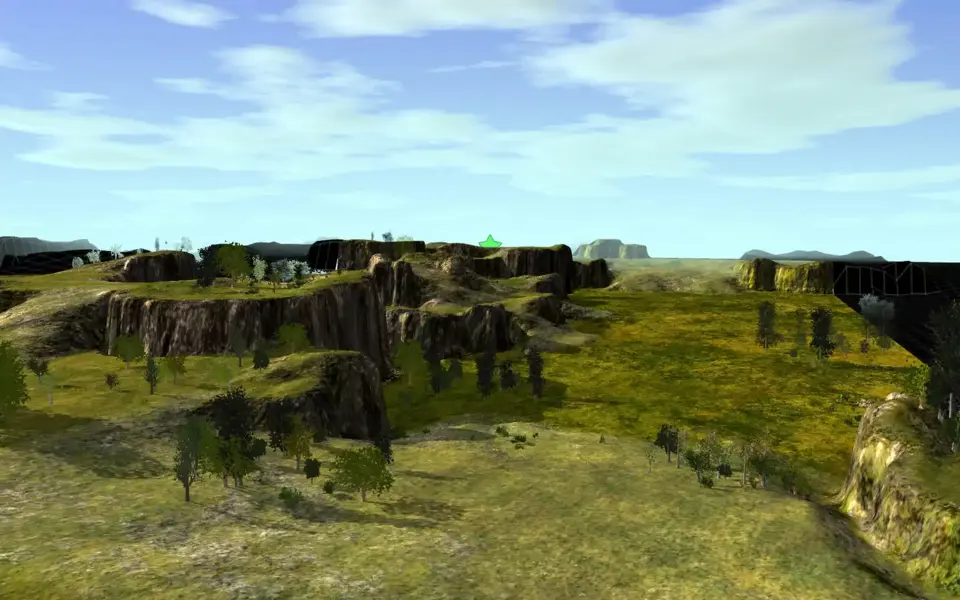
About Evolution RTS
Check out our Discord Server!: https://discord.gg/WUbAs2fPlease Note: Evolution RTS is developed by only one person (with help from other developers on occasion) and has a relatively small but tight knit community, however it is quite active. We use our Discord server to set up games and discuss balance. If you would like to start up a game, you can just click the "Play the Game!" button on the lobby main screen to see if the servers are currently populated, or simply join Discord and ask if anyone is up for a game. The answer is usually yes. To update to the latest version, all you need to do is join a server. The Lobby will download everything you need automatically. Steam already comes with the core game files and maps, but game updates are handled through the lobby. Updates happen early, often, and they are usually only a few kb in size.SPECIAL NOTE FOR LINUX USERS: The libsdl2-dev package is required.Evolution RTS is a free an Open Source RTS game designed using the Spring Engine. It has been in development for many years and receives updates often. Its gameplay is designed specifically to appeal to gamers of all skill levels. The gameplay is designed around the use of unit groups, and the mixture of your unit group often will determine how successful you are in battle, as opposed to churning out hundreds of the same unit continually.
The economy and teching system is easy to learn and use. The game itself supplies many tools that make managing your economy easier so that you can focus more on crushing your enemy than of playing simcity in your base. Units interact using realistic physics and varied terrain (you can actually micro units in order to dodge projectiles!).
Below is a very short list of the features that Evolution RTS has to offer:
Realistic Physics
Projectiles and units use a realistic physics system which allow for unprecedented control and gameplay. Micro your units to avoid projectiles. Hide behind terrain for cover.
Epic and Macro scales
Control the battlefield and a level that feels the most comfortable to you, whether zoomed in controlling individual units, zoomed out viewing the entire map and issuing orders on a macro scale, or somewhere in between! You are in complete control!
Fine tuning controls for builders
Set builders on repeat so that they repeat the orders you give infinitely until they die. Adjust builder priority in order to control the amount of resources allocated to that specific builder’s construction project.
Unique Cover System allows you to easily set up ambushes
Hide your army in rocks and foilage completely undetected and lie in wait to ambush your enemy!
Gameplay geared towards casual gamers in addition to hardcore rts fans, as opposed to only being fun to play at the higher levels
Gameplay designed around being easy to learn yet hard to master. As a newbie you can be up and running in no time, and the gameplay ensures that just because you are new, you aren’t necessarily at a huge disadvantage.
Hundreds of units at once
The Spring Engine allows for hundreds or thousands of units to be beating the daylights out of each other all at once. Gameplay scales seamlessly to fit!
Unique unit abilities
Discover units with special abilities, such as the ORB with it’s incredible area healing abilities, or the Overseer with it’s EMP ability!
Simple Economy
The economy is designed to be easy to learn, and use. There are only two resources in the game; Energy and Metal. Energy is used for utility purposes such as unit ammunition, powering shields, and building nuclear missiles, whereas metal is used to construct structures and units. Metal income is split between allies and resources that overflow the player’s capacity automatically flow into allies banks.
Easy to learn teching system
Simple teching system that revolves around using the same buildings that supply energy as a means to increase your tech availability ensure seamless transitions into heavier unit technologies.
Beautiful effects
Full particle effects engine and beautiful effects painstakingly created down to the last detail ensure that every battle will be visually stunning!
Full Soundtrack
Full in-game soundtrack that highlights the mood based upon whether you are building structures in your base or engaged in an all out no holds barred war for survival will keep you on your toes and fuel your need for dominance! Over 40+ tracks!
Easy battle formations
Easy to use battle formations via selecting a group of units, right-clicking and dragging on the map make it easy for you to give complex orders to your units, even in the midst of a battle!
Intelligent Unit Targeting AI
Units automatically target the best enemy units to attack on their own, leaving you to concentrate on formations, flanking, and commanding your army!
Give orders via the mini-map
Full unit orders can be given via the minimap, so you can control your units intuitively no matter where your camera is pointing.
Place map markers with or without labels, and draw directly on the map
Map markers, drawing, and labels make it easy for you and your allies to communicate your battle plans, and illustrate them!
Unit balance dependent on unit mixture instead of one unit owning an entire army all by itself
Unit balance is designed so that composition matters more than simply churning out hordes of the most expensive unit.
Intelligent builder AI
Builders have a plethora of tools and options available to use to help you with macro tasks so that you can focus on kicking robotic ass!
Completely customizeable GUI
The many parts of the in-game gui can easily be moved around, resized, and positioned exactly how you like it! Be your own boss!
Gorgeously detailed unit textures and designs
Automatic ladder ranking and replay system
http://replays.springrts.com/browse/game=9
Completely free, forever!
Open Source!
http://www.source.evolutionrts.info
Evolution RTS is a continually evolving and developing game; Come and join our community! We love having more people to talk to and play with! Preemptively, welcome to our community!
The economy and teching system is easy to learn and use. The game itself supplies many tools that make managing your economy easier so that you can focus more on crushing your enemy than of playing simcity in your base. Units interact using realistic physics and varied terrain (you can actually micro units in order to dodge projectiles!).
Below is a very short list of the features that Evolution RTS has to offer:
Realistic Physics
Projectiles and units use a realistic physics system which allow for unprecedented control and gameplay. Micro your units to avoid projectiles. Hide behind terrain for cover.
Epic and Macro scales
Control the battlefield and a level that feels the most comfortable to you, whether zoomed in controlling individual units, zoomed out viewing the entire map and issuing orders on a macro scale, or somewhere in between! You are in complete control!
Fine tuning controls for builders
Set builders on repeat so that they repeat the orders you give infinitely until they die. Adjust builder priority in order to control the amount of resources allocated to that specific builder’s construction project.
Unique Cover System allows you to easily set up ambushes
Hide your army in rocks and foilage completely undetected and lie in wait to ambush your enemy!
Gameplay geared towards casual gamers in addition to hardcore rts fans, as opposed to only being fun to play at the higher levels
Gameplay designed around being easy to learn yet hard to master. As a newbie you can be up and running in no time, and the gameplay ensures that just because you are new, you aren’t necessarily at a huge disadvantage.
Hundreds of units at once
The Spring Engine allows for hundreds or thousands of units to be beating the daylights out of each other all at once. Gameplay scales seamlessly to fit!
Unique unit abilities
Discover units with special abilities, such as the ORB with it’s incredible area healing abilities, or the Overseer with it’s EMP ability!
Simple Economy
The economy is designed to be easy to learn, and use. There are only two resources in the game; Energy and Metal. Energy is used for utility purposes such as unit ammunition, powering shields, and building nuclear missiles, whereas metal is used to construct structures and units. Metal income is split between allies and resources that overflow the player’s capacity automatically flow into allies banks.
Easy to learn teching system
Simple teching system that revolves around using the same buildings that supply energy as a means to increase your tech availability ensure seamless transitions into heavier unit technologies.
Beautiful effects
Full particle effects engine and beautiful effects painstakingly created down to the last detail ensure that every battle will be visually stunning!
Full Soundtrack
Full in-game soundtrack that highlights the mood based upon whether you are building structures in your base or engaged in an all out no holds barred war for survival will keep you on your toes and fuel your need for dominance! Over 40+ tracks!
Easy battle formations
Easy to use battle formations via selecting a group of units, right-clicking and dragging on the map make it easy for you to give complex orders to your units, even in the midst of a battle!
Intelligent Unit Targeting AI
Units automatically target the best enemy units to attack on their own, leaving you to concentrate on formations, flanking, and commanding your army!
Give orders via the mini-map
Full unit orders can be given via the minimap, so you can control your units intuitively no matter where your camera is pointing.
Place map markers with or without labels, and draw directly on the map
Map markers, drawing, and labels make it easy for you and your allies to communicate your battle plans, and illustrate them!
Unit balance dependent on unit mixture instead of one unit owning an entire army all by itself
Unit balance is designed so that composition matters more than simply churning out hordes of the most expensive unit.
Intelligent builder AI
Builders have a plethora of tools and options available to use to help you with macro tasks so that you can focus on kicking robotic ass!
Completely customizeable GUI
The many parts of the in-game gui can easily be moved around, resized, and positioned exactly how you like it! Be your own boss!
Gorgeously detailed unit textures and designs
Automatic ladder ranking and replay system
http://replays.springrts.com/browse/game=9
Completely free, forever!
Open Source!
http://www.source.evolutionrts.info
Evolution RTS is a continually evolving and developing game; Come and join our community! We love having more people to talk to and play with! Preemptively, welcome to our community!
Score Not confirmed
Released April 7, 2014
Genres
Developer
Publisher
Platforms
PCLinux
Evolution RTS System Requirements
Minimum
- OS:
- Not confirmed
- CPU:
- Not confirmed
- GPU:
- Not confirmed
- RAM:
- Not verified
- Storage Required:
- Not verified
Recommended
- OS:
- Not confirmed
- CPU:
- Not confirmed
- GPU:
- Not confirmed
- RAM:
- Not verified
Explore games and compare your hardware
Related games
Measure performance with a repeatable test · Check SSD and installation space